
A Practical Guide to Student Information Systems (SIS) for Private Schools
Private and independent schools manage admissions, enrollment, student records, attendance, academics, scheduling, tuition and student billing, communication, and reporting. Managing this information across spreadsheets and disconnected systems creates duplicate work and makes records hard to access.
A student information system (SIS) centralizes these processes, connecting student records, academics, attendance, scheduling, communication, and financial information.
For private schools, the right student information system can support the student journey from inquiry through graduation while improving access to information and collaboration. This guide covers what an SIS is, its key features, and what to consider when choosing an SIS system for schools.
What Is a Student Information System?
A student information system (SIS) is software that centralizes and manages student and school information. An SIS can connect records that might otherwise be spread across separate applications, spreadsheets, and files.
Depending on the platform, an SIS may manage:
- Student and family records
- Admissions and enrollment
- Attendance and schedules
- Grades and transcripts
- Tuition and student billing
- Communication and portals
- Reporting and analytics
- Discipline and student records
- Teacher gradebooks
- Integrations with other education software
Capabilities vary by provider, so private schools should evaluate how well student information management systems support their overall workflows, not just record-keeping.
SIS vs. Other School Management Systems
Education technology terminology can be confusing. Schools may encounter terms such as SIS, school management system, learning management system (LMS), and management information system.
What Is the Difference Between an SIS and an LMS?
An SIS manages student and administrative information, while an LMS focuses on teaching, learning, assignments, and course materials. The two can work together, with the SIS maintaining official records and the LMS supporting classroom activities. Integrating them can reduce duplicate data entry and keep information consistent.
What Is a School District Management Information System?
A school district management information system manages information across multiple schools within a district. Private schools may not need district-level features, so they should focus on whether an SIS supports their workflows, including admissions, re-enrollment, tuition and student billing, academics, attendance, communication, and reporting.
What Does SIS Information System Mean?
You may also encounter the phrase SIS information system during online searches. In practice, it usually refers to a student information system and is often used interchangeably with SIS. Regardless of the terminology, the important question is what the software can actually do for your school.
Why Do Private Schools Need an SIS?
Private schools often have lean administrative teams managing different parts of the student lifecycle. Without a centralized system, information can become fragmented. An SIS provides a shared source of student information while giving authorized users access to the records they need.
1. Centralize Student Records
An SIS keeps student information, including contact details, emergency contacts, classes, attendance, grades, and family records, in one centralized location.
Authorized staff can access and update records directly, reducing reliance on spreadsheets, paper files, and duplicate requests across departments.
2. Reduce Duplicate Data Entry
Repeatedly entering the same information wastes time and increases errors. For example, when a student moves from admissions to enrollment, staff should not need to re-enter existing data.
Integrated student information systems can transfer information between connected processes, reducing repetitive administrative work.
3. Improve Communication With Families
Parents and guardians increasingly expect convenient access to school information.
An online student portal can provide families with information such as:
- Grades
- Attendance
- Schedules
- Assignments
- Announcements
- School calendars
- Forms
- Billing information
An online student information system can make this information available through secure web portals or mobile access, depending on the platform.
This can reduce routine questions sent to school offices while giving families greater visibility into their child's school experience.
4. Support Better Administrative Decisions
Administrators need reliable data for enrollment, scheduling, staffing, student support, and school operations.
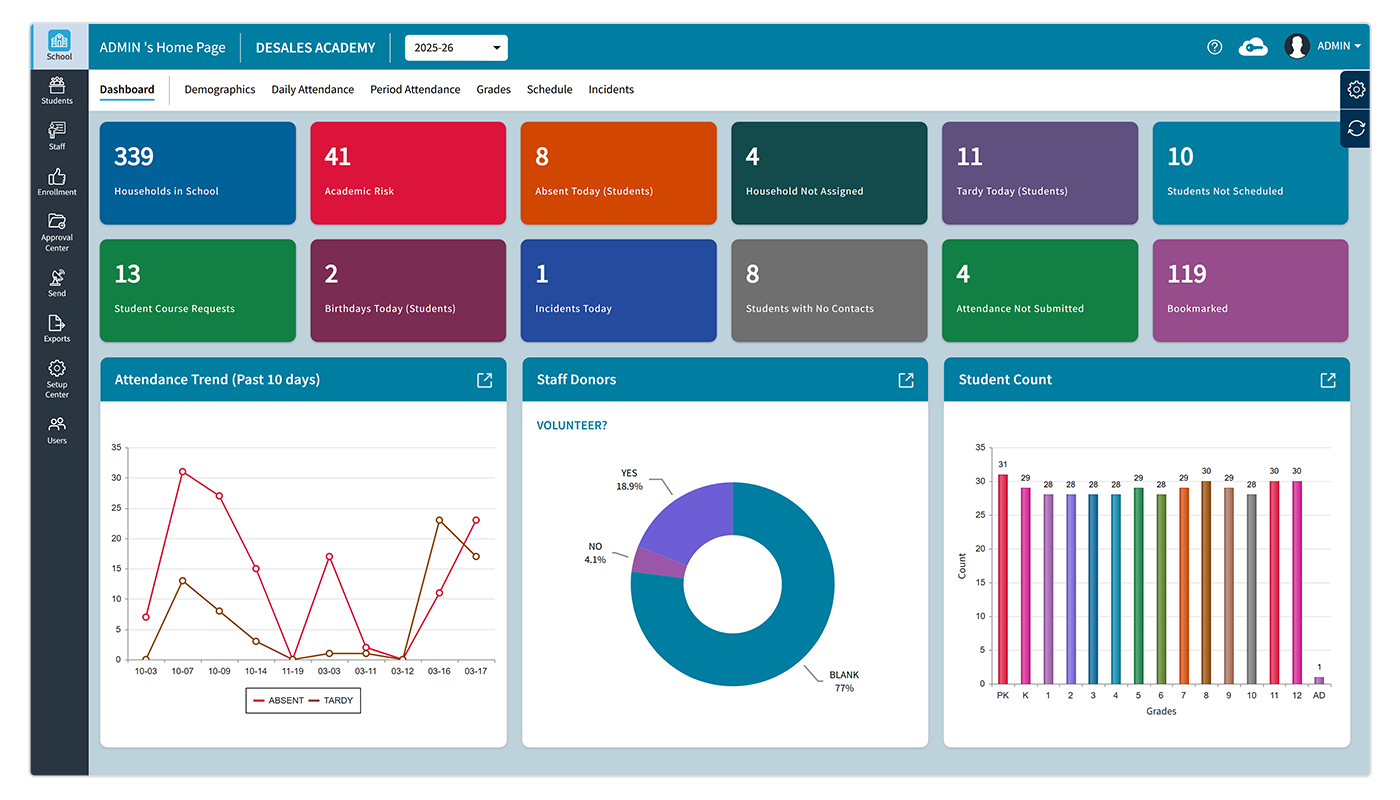
A centralized SIS (student information system) makes it easier to generate reports and identify trends in areas such as attendance, enrollment, and academic performance, supporting better planning.
Key Features to Look for in an SIS for Private Schools
Not every SIS offers the same functionality. Before choosing a system, school leaders should identify their highest-priority workflows and evaluate each platform against those requirements.
Student and Family Database
A reliable student database is the foundation of any student information system for private schools.
Look for the ability to manage:
- Student demographics
- Parent and guardian contacts
- Family relationships
- Emergency contacts
- Enrollment status
- Student history
- Custom fields
- Important documents
- Relevant school records
The database should also make it easy for authorized staff to find information without navigating complicated workflows.
Admissions and Enrollment
A strong SIS connects the student journey from inquiry and application through acceptance, enrollment, and re-enrollment, reducing the need to transfer information between disconnected systems.
Online applications and forms also simplify the process for families, while integrated enrollment data supports long-term school planning.
Attendance Management
An SIS can manage attendance tracking by recording:
- Daily attendance
- Period attendance
- Absences
- Tardiness
- Early dismissals
- Attendance reasons
- Attendance history
It should make recording easy for teachers, give administrators school-wide visibility, and help schools communicate attendance information to families efficiently.
Scheduling
Scheduling becomes complicated as students progress through different grades and course options.
An SIS supports:
- Class schedules
- Course assignments
- Teacher assignments
- Homerooms
- Sections
- Course requests
- Schedule changes
- Master scheduling
For middle and high schools, identifying scheduling conflicts is important.
Grades, Report Cards, and Transcripts
Academic records need to be accurate, accessible, and consistent. A suitable SIS allows schools to manage:
- Grades
- Assessments
- Teacher comments
- Report cards
- Progress reports
- Transcripts
- Academic histories
- Skills or standards
An integrated teacher gradebook can simplify moving information between classrooms and the school's central records.
For example, Rediker's TeacherPlus Gradebook connects teachers' gradebook data with its AdminPlus SIS. It allows schools to manage grades, attendance, reports, and related information through connected workflows.
Tuition and Student Billing
Private schools need an SIS that supports tuition and student billing, payment schedules, financial aid, and other charges. Integration with billing systems can reduce duplicate data entry and make online invoices and payments easier for families.
Parent and Student Portals
A portal gives families a direct way to interact with school information. Depending on the platform, parents can view:
- Attendance
- Grades
- Schedules
- Assignments
- Announcements
- School calendars
- Forms
- Billing information
Students can use portals to access schedules, academic information, assignments, and other relevant resources. For private schools, this is more than a convenience. Clear and timely communication contributes to the overall family experience.
Reporting and Analytics
Administrators need more than stored information. They need usable information. A strong student information system (SIS) for schools should provide reporting tools that help answer practical questions.
For example:
- How many students are enrolled in each grade?
- What are current attendance patterns?
- Which students have missing grades?
- How many students are returning next year?
- What information does the school need for internal reporting?
- Which administrative processes require attention?
Custom reports can be especially valuable because private schools often have different requirements based on their size, educational model, accreditation, and mission.
Security and Access Controls
Student information is sensitive. An SIS should therefore include appropriate safeguards around who can access, modify, and share information.
Important capabilities may include:
- Role-based permissions
- Secure authentication
- Access controls
- Data encryption
- Audit capabilities
- Secure backups
- Mobile security
- Multi-factor authentication where appropriate
The
U.S. Department of Education recommends safeguarding student records against privacy and security risks. Private schools should review the laws and contractual requirements that apply to them, as
FERPA does not apply to every private school. Schools should assess their specific legal obligations rather than assume one framework applies universally.
How an SIS Supports Faith-Based Schools
Faith-based schools have unique administrative and community needs. A flexible SIS can support core student-management tasks while adapting to each school's specific requirements.
Catholic and Christian Schools
Catholic and Christian schools can use an SIS to manage academics, faith-based activities, schedules, communications, and student records while supporting their specific needs.
Lutheran Schools
Lutheran schools can use an SIS to manage student enrollment, attendance, grades, schedules, family information, and communication while configuring workflows around the school's own academic and community structure.
Episcopal Schools
Episcopal schools often combine independent-school administration with distinctive community programs and traditions. A flexible student information system (SIS) lets administrators maintain standard student records while accommodating school-specific processes.
Jewish Schools
Jewish day schools can use an SIS to manage academics, Hebrew or Jewish studies, activities, and family communication, with flexible scheduling and reporting for multiple programs.
Muslim Schools
Muslim schools may combine general academics with Islamic studies, Arabic, and religious observances. A flexible SIS can help manage schedules, attendance, academic records, and communication while supporting the school's specific needs.
How an SIS Supports the Student Lifecycle
One of the biggest advantages of modern student information management systems is their ability to connect different stages of the student lifecycle.
Inquiry and Admissions
The process may begin before a student officially enrolls. Admissions teams can collect inquiries, applications, recommendations, forms, and other information digitally.
Enrollment and Re-Enrollment
Once a student is accepted, relevant information can move into the school's central student record. For returning students, online re-enrollment can reduce paperwork and simplify the process for both families and staff.
Academic Management
Once enrolled, students interact with teachers and administrators through schedules, classes, assignments, grades, and attendance. A connected SIS keeps these records organized.
Family Communication
Throughout the year, parents need access to relevant information. Portals can provide a central place for schedules, grades, attendance, announcements, and other school information.
Graduation and Records
At the end of a student's school journey, the student information system (SIS) can provide access to historical academic information, transcripts, attendance records, and other records the school needs to retain.
This lifecycle approach is one reason an online student information system can be more useful than a collection of independent administrative tools.
How to Choose the Right SIS for Your Private School
Selecting an SIS is a long-term technology decision. The lowest-cost system is not necessarily the most appropriate, and the platform with the longest feature list may not be the easiest for staff to use.
Start With Your School's Current Workflows
Before speaking with vendors, document how your school currently manages:
- Admissions
- Enrollment
- Student records
- Attendance
- Scheduling
- Grades
- Report cards
- Tuition and student billing
- Parent communication
- Reporting
Identify where staff currently duplicate information or rely on spreadsheets and manual processes.
Consider Who Will Use the System
An SIS affects more than administrators.
Consider the needs of:
- School leadership
- Registrars
- Admissions staff
- Teachers
- Counselors
- Business-office staff
- IT staff
- Parents
- Students
A system can have extensive functionality but still create problems if everyday users find it difficult to navigate.
Evaluate Integrations
Your SIS may need to work with other platforms already used by the school. Ask vendors about integrations with:
- Learning management systems
- Gradebooks
- Accounting platforms
- Tuition payment systems
- Admissions tools
- Communication platforms
- Identity management systems
- Calendar tools
- Data exchange standards
A strong integration strategy can prevent your school from creating another isolated data silo.
Review Implementation and Support
Implementation matters as much as functionality. Ask:
- How is data migrated?
- What training is provided?
- How long does implementation typically take?
- Who supports administrators during launch?
- What happens when the school has a problem?
- How frequently is the platform updated?
- What resources are available for teachers and families?
The best SIS on paper will not deliver its full value if staff do not receive adequate training and support.
Consider Scalability
Your school may have different needs five years from now. Consider whether the system can support:
- Enrollment growth
- Additional grades
- New programs
- More complex scheduling
- Additional integrations
- Multiple campuses
- Expanded reporting
- Changing family communication needs
Scalability is particularly important for growing independent schools that are expanding their programs or student population.
Questions to Ask an SIS Vendor
Before deciding, create a standardized list of questions and ask each vendor to demonstrate the relevant workflows.
Student Data
- How is student information organized?
- Can administrators create custom fields?
- Can families update selected information?
- How are duplicate records handled?
Academics
- How are grades entered?
- Can teachers access the system through a browser or mobile device?
- Can the platform create report cards and transcripts?
- How does scheduling work?
Attendance
- Can teachers record attendance quickly?
- Does the system support daily and period attendance?
- Can administrators create attendance reports?
- Can parents access attendance information?
Financial Management
- Does the platform support tuition and student billing?
- Can it manage payment plans?
- Does it support online payments?
- Does it integrate with accounting software?
Communication
- Is there a parent portal?
- Is there a student portal?
- Can the school send targeted communications?
- Can families with multiple children access information through one account?
Security
- What security controls are available?
- How is access managed?
- Is multi-factor authentication available?
- How are backups handled?
- What information is available about the vendor's security practices?
Implementation
- How is existing data migrated?
- What training is included?
- What ongoing support is provided?
- What integrations are available?
Common Mistakes to Avoid When Choosing an SIS
Choosing Based Only on Price
Consider the cost of an SIS alongside implementation, training, integrations, support, and the staff time required to operate the system. A lower initial price may not represent a lower total cost if the system requires extensive manual work.
Buying More Features Than You Need
A long feature list does not automatically make a system appropriate for your school. Prioritize features that solve actual operational problems.
Ignoring the User Experience
Teachers and administrators use an SIS every day. A complicated interface can undermine adoption even if the underlying technology is powerful. Request demonstrations that reflect real school workflows rather than generic sales presentations.
Treating Data Migration as an Afterthought
Historical student information can be valuable. Before selecting a platform, understand what information can be migrated, how it will be cleaned, and how records will be validated.
Failing to Plan for Training
Training should include the different groups who will use the system. Administrators may need advanced reporting skills, while teachers may need focused training on attendance and grades.
What Does the Future of SIS Look Like?
The student information system (SIS) is evolving as schools adopt more connected technology. Cloud-based platforms, integrations, reporting tools, automation, and AI can make student information more accessible and useful.
However, schools should prioritize security, accuracy, practical value, and scalability. For private schools, the right SIS should support current needs while allowing room for future growth.
Conclusion
A modern student information system for private schools can connect key processes such as admissions, enrollment, academics, attendance, communication, and billing in one place.
For private schools, an integrated SIS reduces manual work, improves access to information, and helps administrators better support students, families, and staff.
Rediker's AdminPlus for private schools supports student records, attendance, scheduling, report cards, transcripts, discipline, billing, and communication, with integrations for tools such as TeacherPlus Gradebook and admissions solutions. If you’re interested, contact our team today.
Frequently Asked Questions (FAQs)
What Is The Difference Between an SIS and a School Management System?
The terms can overlap. An SIS traditionally focuses on student records and academic or administrative information, while a school management system may include a broader collection of functions such as admissions, billing, communication, accounting, and website management.
Do Private Schools Need a Student Information System?
Private schools are not all required to use an SIS. However, a centralized system can help schools manage growing amounts of student information and reduce manual administrative work. The value depends on the school's size, workflows, technology environment, and operational requirements.
Can an SIS Manage Tuition and Student Billing?
Rediker’s system includes billing functionality. It lets schools manage tuition plans, invoices, payments, discounts, financial aid, and other charges.
Can Faith-Based Schools Use an SIS?
Yes. Catholic, Christian, Lutheran, Episcopal, Jewish, Muslim, and other faith-based schools can use an SIS to manage standard school operations, including student records, enrollment, attendance, grades, schedules, and communication. A flexible platform can also accommodate school-specific programs and workflows.
What Should a Private School Look For in an SIS?
Private schools should consider the quality of the student database, admissions and enrollment tools, attendance, scheduling, academic records, tuition and student billing, portals, communication, reporting, security, integrations, implementation, training, and support.
Is an Online Student Information System Better Than an On-Premises System?
An online student information system offers convenient access through web browsers and reduces the local infrastructure maintenance requirements.
However, evaluate security, reliability, data ownership, integrations, support, and total cost before choosing a deployment model.
How Does an SIS Improve Communication with Parents?
An SIS can provide secure parent portals where families can access relevant information such as attendance, grades, schedules, assignments, announcements, and billing information. This gives families a centralized source of school information and can reduce routine administrative inquiries.
Share this Post: